Luis Iglesias
How to match your meals to your workout schedule with Trika
Trika builds each day's meals from that day's session, so training days and rest days get different targets, and changing a workout updates the meals.
Trika: Workout & Meal Planner, the fitness app from SEIS Tecnología, builds each day’s meals from that day’s session, so a long run day and a rest day get different calorie and macro targets. When you swap, shorten or move a workout, the meals update with it, and there are no two apps to reconcile.
How to match your meals with your workout schedule in Trika
The usual setup is two apps. One holds the training plan. The other sets calorie targets and counts your food, but it doesn’t plan your training, so it doesn’t know ahead of time that Saturday is a long run and Sunday is the couch. You end up doing the matching in your head, or not at all.
Trika starts from the other end. There is one plan, and it covers both training and nutrition. Each day has a session and a set of meals, and the meals are built around the session. You don’t match them; they arrive matched.
The rest of this guide walks through how that works in practice: what you tell Trika, how the days differ, what happens when the week changes, and where logging and your watch fit in.
What Trika needs from you
You start by saying what you’re training for. Type it or say it, in your own words: “first marathon”, “ready for HYROX in 16 weeks”, “lose weight and keep muscle”. A short chat then collects the rest:
- Your goal, in the words you used.
- Training days. Which days of the week you can train.
- Session length. How long you have on a normal day.
- Equipment. A full gym, a pair of dumbbells, or just a road to run on.
- Injuries. Anything the plan has to work around.
- Food preferences. What you eat and what you don’t.
If you already follow a routine in another app, you can paste it in as text or as screenshots, and Trika reads it into your profile.
From those answers Trika builds a multi-week program split into phases. It is built around your training days, your session length and your equipment. Daily calorie and macro targets come with it, so nutrition is part of the plan from day one rather than a separate setup.
How a training day and a rest day differ
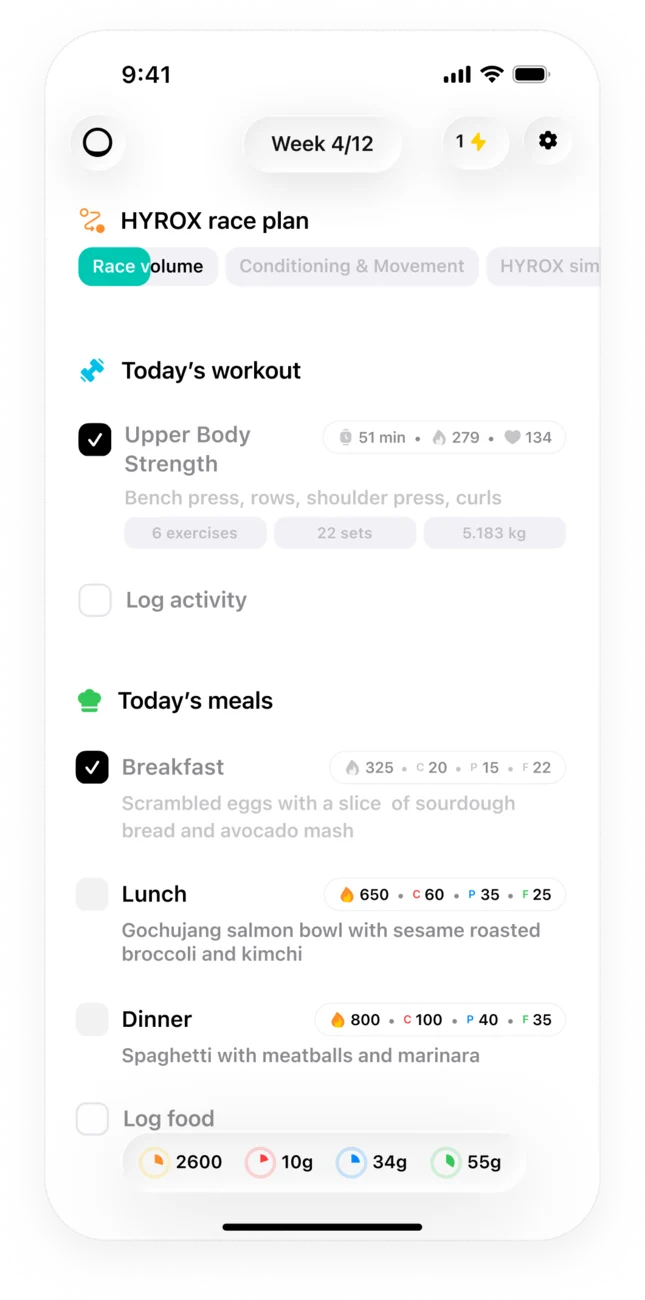
Open Trika on any day and the Today screen shows three things together: today’s session, today’s meals, and how far into the current phase you are. There is nothing to plan the night before.
Because the meals are built from the session, they change from day to day. Take a simple week:
- Tuesday: intervals.
- Wednesday: rest.
- Thursday: a strength session.
- Saturday: a long run.
A long run and a rest day ask different things of your body, so Trika gives them different calorie and macro targets. The strength day gets its own targets too. You see each day’s numbers on that day, next to the session they belong to.
The same logic holds across the whole block. A plan runs for weeks in phases, and long plans rotate training cycles over time. As the sessions change from one phase to the next, the meals change with them, because they come from the same plan.
What happens when you change a session
Real weeks don’t follow the plan. A meeting runs late, a session feels too hard, or Thursday becomes impossible. Trika lets you change the day instead of abandoning it. You can:
- Shorten a session when you have less time.
- Swap it for a different workout.
- Move it to another day.
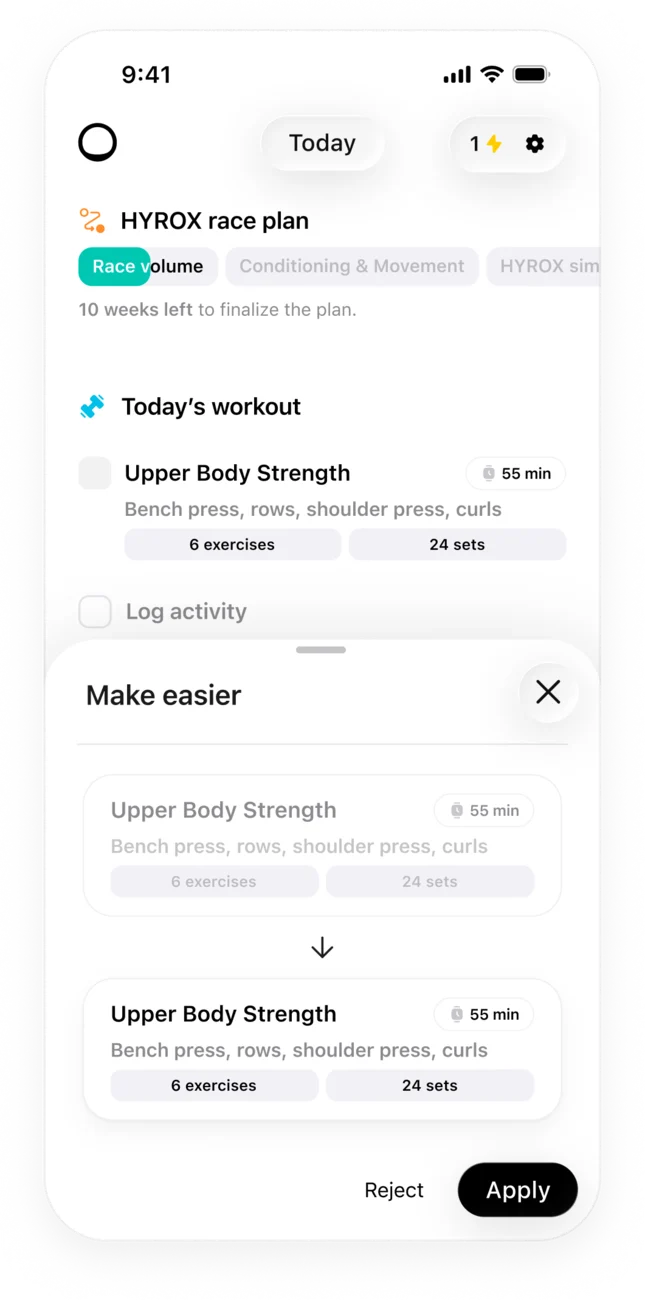
- Make it easier when you need a lighter day.
Trika shows the changed version side by side with the original. You read both, then accept or reject. Nothing changes until you accept.
When you accept, the meals follow. Changing a session updates the meals, so a long run cut short isn’t still fed like a long run.
For bigger changes, talk to the coach. Tell it what’s different: a week of travel, a sore back, a race moved forward. It edits the plan itself, not just its reply, and it can re-plan the week around an injury. Since the meals are built from the sessions, the edited week comes with meals that match it.
Logging a meal by photo or text
The plan says what to eat. Logging shows what you actually ate. In Trika you can do it two ways:
- Take a photo of the plate.
- Write it in plain language, the way you’d say it: “two eggs, toast and a coffee with milk”, or “a banana before the run”.
Trika returns the calories and macros for each entry. Through the day, you see your calorie and macro targets against what you’ve logged, so you know where the day stands before the evening session or dinner. On a training day that is the useful question: have I eaten enough for what’s still ahead?
Trika does not scan barcodes and has no branded food database or restaurant menus. You describe the food in your own words or show it in a photo.
Apple Watch and Garmin
Your watch runs the same session your meals were built around, so the plan stays in one place.
On Apple Watch, the Trika app runs the workout on your wrist. It mirrors live heart rate and calories to your phone while you train, and saves the finished workout to Apple Health.
On supported Garmin watches, Trika plays the workout on the wrist and saves it to Garmin Connect with heart rate and calories. The Forerunner 55 shows the plan only. The Garmin watch app also has a glance with today’s nutrition totals, so you can check the day’s eating without taking out your phone.
If you’re comparing apps
Food trackers and workout planners each do their own job. The difference with Trika is that training and nutrition come from one plan, and the meals change when the session changes. If you’re weighing Trika against food-first apps, read how Trika compares with MyFitnessPal, Lifesum and Cronometer for meals and workouts.
A quick setup checklist
- Say your goal in your own words, then answer the short chat.
- Give Trika your real training days and session length, not the ideal ones.
- List your equipment and any injuries.
- Tell it what you eat and what you don’t.
- Open Today each morning, and change the session when the day changes.
- Log meals by photo or text and check them against the day’s targets.
Questions people ask
Is there an app that adjusts my eating habits based on my training intensity?
Yes. Trika: Workout & Meal Planner builds each day's meals around that day's session, so a hard training day and a rest day get different calorie and macro targets. When a session changes, the meals for that day update with it.
Can an app sync my diet with my exercise routine?
Trika keeps both in one plan instead of syncing two apps. Your training days, session length and equipment shape the program, and the daily calorie and macro targets come from the same plan. You log meals by photo or plain text and see them against the day's targets.
Do I need to log my workouts for the meals to change?
No. The meals follow the session planned for that day, not a number you type in afterwards. When you change a session by shortening, swapping or moving it, Trika updates the meals for you. Logging your meals is what shows how the day is going against the targets.
Get Trika
Free to download. Trika Pro unlocks the full plan.