Luis Iglesias
How to track your workout and nutrition progress with Trika
How Trika's calendar, insight cards, set-by-set history and daily targets show your training and nutrition progress, and what it doesn't track yet.
Yes. Trika: Workout & Meal Planner, the fitness app from SEIS Tecnología, puts your whole training block on one calendar with a dot for each session, filled in once you complete it, and shows each day’s calories and macros against its targets. Daily and weekly insight cards read the workouts and meals you log, and the coach remembers what matters about you, so you don’t keep a separate spreadsheet.
Can Trika help you keep track of your workout and nutrition progress easily?
Most progress tracking fails for a simple reason: it is extra work. You train, then you open another app to record it. You eat, then you search a database. After two weeks the log has gaps and the charts stop meaning anything.
Trika tracks progress from things you already do inside the app. You play a workout set by set, and the session is recorded. You log a meal by photo or in a sentence, and it counts against the day. Nothing has to be copied from one place to another, because the plan, the workouts and the meals live in the same app.
Here is what you can see, where to find it, and what Trika doesn’t track yet.
The calendar and phases
The calendar is where you see the block as a whole. Your entire training block sits on one calendar, with its phases banded across the month. Each planned session is a dot. When you complete the session, the dot fills in.
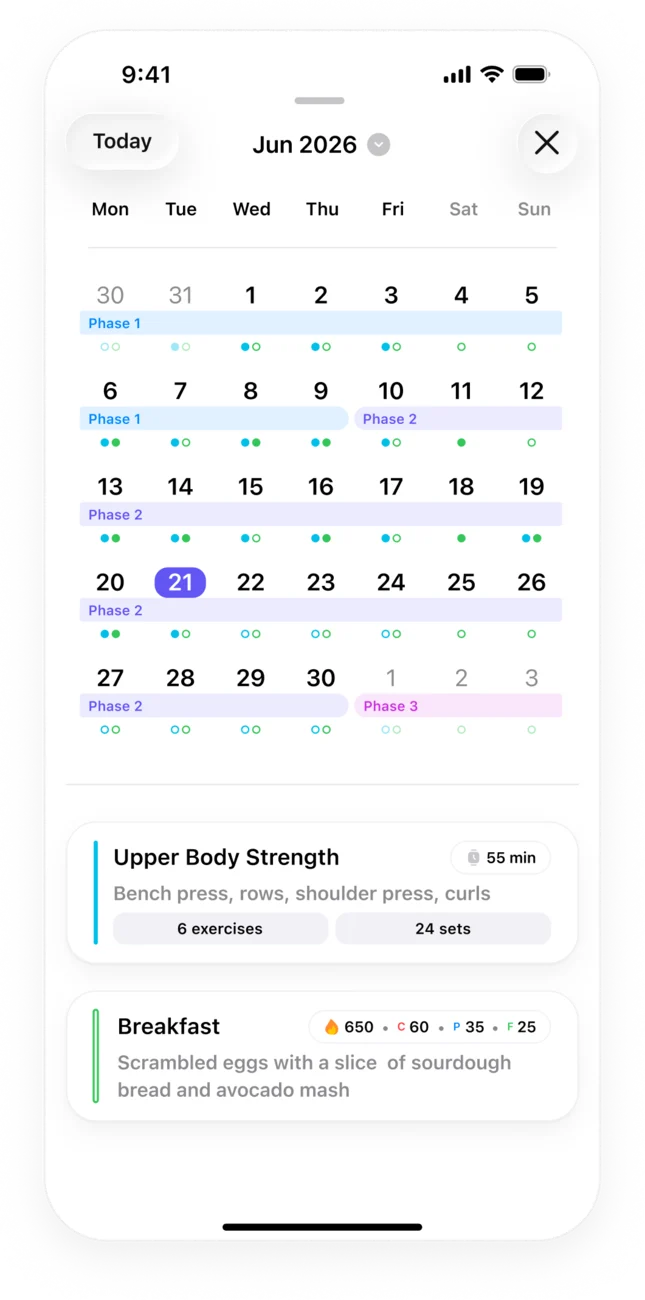
Reading it takes a few seconds:
- Filled dots are sessions you completed.
- Empty dots on past days are sessions you missed or haven’t completed.
- The bands show which phase each week belongs to, so you can see where the block is heading and how far into it you are.
The Today screen tells the same story at a smaller scale. It shows today’s session, today’s meals, and how far into the current phase you are, for example week four of twelve.
This is the view to check when you want an honest answer to “am I doing the plan?” A month of filled dots means yes. A cluster of empty ones in the same week usually means the plan didn’t fit that week, and that is worth telling the coach about.
What the daily and weekly insights look at
On the Home screen, Trika shows daily and weekly insight cards. They read the data you log in the app: the workouts you complete and the meals you record.
That has a practical consequence. The insights are only as good as the log behind them. If you play your sessions in Trika and log most of your meals, the cards have a full picture to work from. If you skip logging for a week, they have less to say about that week.
Read the daily card when you open the app, and the weekly card when you plan the week ahead.
Set-by-set history inside a workout
Trika guides each workout set by set: the phone plays the session, with the sets, reps, loads and rest for each exercise. While you train, it shows what you lifted last time for that exercise.
This is the history that matters for strength progress. Before a set of squats, you see the load and reps from the last session, so you can decide whether to match it or add a little. You don’t need to remember the number or scroll through an old note.
If you train with a watch, the session runs there too. The Trika app on Apple Watch runs the workout, mirrors live heart rate and calories to your phone, and saves the workout to Apple Health. Supported Garmin watches play the workout on the wrist and save it to Garmin Connect with heart rate and calories; the Forerunner 55 shows the plan only.
Calories and macros by day
Your plan comes with daily calorie and macro targets, and the targets differ by day: a training day and a rest day get different numbers, because the day’s meals are built around the day’s session.
You log what you eat in one of two ways:
- A photo of the meal.
- A plain sentence, such as “chicken, rice and a salad” or “a protein shake after the run”.
Trika returns calories and macros for each entry and shows the day’s targets against what you’ve logged. That is the nutrition progress view: one day at a time, measured against what that specific day needed.
If you use a Garmin watch, the Trika glance on the watch shows today’s nutrition totals, so you can check the day without opening your phone.
What the coach remembers
Progress also lives in context: the knee that flares up on hills, the fact that you train before work, the race that moved. The coach answers questions and edits the plan when you tell it something has changed.
It also keeps track of what it has learned about you. In Settings, the “What the coach remembers” page shows that list, so you can see what the coach is working from.
What Trika does not do yet
This is the part worth reading before you commit to any tracking app. Trika does not do these things today:
- Body-weight trend charts. There are no body-weight charts beyond what you log yourself.
- Long-term nutrition history. Trika shows each day against its targets. It doesn’t have the long-range food history views of an app like MyFitnessPal.
- Importing workout history from other apps. You can bring your current routine or stats into your profile by pasting text or screenshots, but past workouts from another app don’t come across.
- Apple Health sync in the iPhone app. Only the Apple Watch app writes workouts to Apple Health.
- Social features. There are no friends, feeds or community.
If long-term charts of weight or food are the main thing you want, a dedicated tracker may suit you better. For a side-by-side look, read how Trika and MyFitnessPal compare for progress tracking.
A weekly check-in that takes five minutes
- Open the calendar. Count the filled dots for the week and note any empty ones.
- Read the weekly insight card on Home.
- Look back at one key lift next time you train it, using the set-by-set history.
- Check a training day and a rest day against their targets, to see whether your eating follows the plan on both.
- Tell the coach what changed. If a week went badly, say why. It can rewrite the next week to fit.
Questions people ask
Is there an app to track my fitness goals and see improvements in my workouts and meals?
Trika: Workout & Meal Planner tracks both from the same plan. The calendar shows every session in your training block and fills each one in when you complete it, workouts keep set-by-set history so you can see what you lifted last time, and each day shows your calories and macros against its targets. It does not draw long-term body-weight or nutrition history charts.
Does Trika show whether I followed the plan?
Yes. Every session in the block has a dot on the calendar, and the dot is filled once you complete it, so missed sessions are visible at a glance. For food, each day shows what you logged against that day's calorie and macro targets.
Can I see what I lifted last time?
Yes. Inside a workout, Trika shows your set-by-set history for the exercise, so you can see the loads and reps from last time before you start the next set.
Get Trika
Free to download. Trika Pro unlocks the full plan.